Press fx
Blending options
underlying layer UP!
Posts mit dem Label Photoshop Tool werden angezeigt. Alle Posts anzeigen
Posts mit dem Label Photoshop Tool werden angezeigt. Alle Posts anzeigen
Mittwoch, 28. Januar 2009

Donnerstag, 27. November 2008
How to make teeth or so in photoshop
Import everything into one folder
Make what ever u want the above things to be hidden in the most bottom layer
Press ALT-APPLE-G on each of the layers u want to have inside
DONE
Dienstag, 28. Oktober 2008
Wind Application in Photoshop
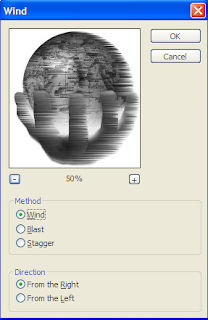
The wind application is very useful if u want to make something look as if it was in the wind. The way of applying this tool is very simple:
- Open Photoshop
- Choose Filter in the top menu
- Press on Stylize
- Then Wind
- And then you have already got the menu seen below.
- You can then choose if u want to make it look like wind, blast or stagger, and if u want it coming from the left or the right.You can also zoom in and out, depending on what exactly you want to see. This is the Wind tool…. Have fun!




Abonnieren
Posts (Atom)